SystmConnect is a way to contact your GP practice online. SystmConnect is easy to use and will give your doctors all the information they need to triage and make sure every patient gets the care they need. You can use SystmConnect to ask for advice from one of our doctors, for self-help information or if you have an administrative request. Click on the image opposite - you will receive a response before the end of the next working day or sooner.
Managing your health
Using your NHS account or SystmOnline
There are other tasks you can do online, like:
- order repeat prescriptions
- view your test results
- see parts of your health record
- check or cancel appointments
- see your vaccination record
For these, you can use your NHS account or SystmOnline. You can access them using their websites or apps.
Setting up an NHS account/NHS App
To set up your NHS account for the first time, you will need to set up an NHS login. Read about how to set up NHS login (nhs.uk).
Once you have set up your NHS login, you can log in to your NHS account or download the NHS App onto your phone.
Setting up SystmOnline
To set up SystmOnline for the first time:
- visit the surgery with some proof of your identity including a photo ID
- we will give you a username and password
- go to SystmOnline or use the app to register
Accessing someone else’s information (Proxy access)
As a parent, family member or carer, you may be able to access services for someone else. We call this having proxy access. We can set this up for you if you are both registered with us, forms are available from reception.
Home Blood Pressure Readings
How to Take Your Blood Pressure at Home
Monitoring your blood pressure at home can help give a more accurate picture of your heart health and help your healthcare team make informed decisions about your care.
Before You Begin
Click here for printable Home Blood pressure form.docx
To get the most accurate reading:
- Avoid caffeine, smoking, alcohol, and exercise for at least 30 minutes beforehand
- Empty your bladder before taking a reading
- Sit quietly and rest for 5 minutes before starting
- Wear loose clothing or remove tight sleeves from your upper arm
How to Take Your Blood Pressure
- Sit in a chair with your back supported and both feet flat on the floor
- Rest your arm on a table so the cuff is at heart level
- Place the cuff on your upper arm following the monitor instructions
- Stay still and avoid talking during the reading
- Take two readings, one minute apart
- Record both results, including the date and time
When to Measure
- Take readings twice daily — once in the morning and once in the evening
- Continue for 5 days if you have been asked to complete a home monitoring check
Sending it to us
- Drop into reception/post box outside opening hours
- email a copy of your readings to puddletown.reception@dorsetgp.nhs.uk
Tips for Accurate Readings
- Use the same arm each time
- Take readings at similar times each day
- Make sure the cuff fits correctly
- Keep a written or digital record of your results
When to Seek Medical Advice
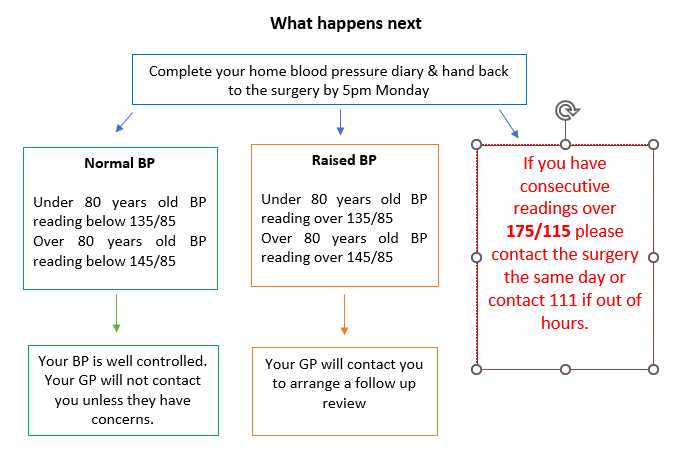
If you have consecutive readings over 175/115 Please contact the surgery the same day. However if you experience symptoms such as chest pain, shortness of breath, severe headache or dizziness contact 999.
Page last reviewed: 12 October 2026
Page created: 12 October 2026
Page created: 12 October 2026